The A Dance of Fire and Ice Web Version: What It Includes
Published · 3 min read
If you have seen A Dance of Fire and Ice on Steam or a phone, the version on this site may surprise you. It is the free web version that fizzd and 7th Beat Games put online before the full release. This post explains what is in it, what is not, and why it is still worth playing.
What this version is
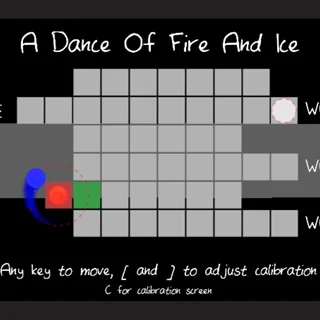
The title screen says it plainly: 7th Beat Games, v0.4.2, December 2018. Hafiz Azman (fizzd) is credited for the game, Giacomo Preciado for additional code and Kyle Labriola for art. It is a Unity WebGL build, so it runs in a normal browser tab with no plugin. The core is the same idea as the full game: a fire planet and an ice planet orbit each other, one press per tile, and the shape of the path is the rhythm.
What you get
- Device Calibration. A timing test before you play that measures your screen and audio lag and gives you a rank. You can run it again at any time with C, or adjust the result with [ and ].
- A title map you walk through. The title screen is itself a grid of tiles, with Continue and World 1, World 2 and World 3 at the ends of its paths, and you reach one by pressing in rhythm until the planets get there.
- Three worlds. Each is a set of levels behind its own entrance on the map. The map tiles light up in colours as the planets pass over them.
- Saved stats. The game remembers your highest level reached and, for each world, your attempts, wins and win rate. The progress is stored in your browser. Holding R on the title screen erases it.
- Speed and direction tiles. Snail and rabbit icons slow down or speed up the orbit from that tile on, and swirl icons reverse the spin — the same building blocks the full game uses.
- Chinese text. Tab switches the interface to Chinese, translated by a player called craft.
What is only in the full game
The Steam and mobile release is a much bigger game. It has many more worlds and songs, new tile types beyond those here, extra modes and a level editor that the community uses to make custom levels. None of that is in the web version, and this site does not pretend otherwise. If the web version hooks you, the full game is the next step, and buying it supports the people who made it.
Why play the web version at all
Because it is the whole idea in a small, clean package. The full game gets very hard very quickly, and the web version is a gentler place to learn the basic skill: reading an angle as a length of time. The calibration screen is also a good way to find out how much lag your setup has. And it runs on hardware that could never install the full game — a school Chromebook, an old laptop, a borrowed computer.
Getting it running
The first load downloads about 20 MB, so wait for the calibration screen to appear. Then click inside the game once so it receives your key presses. Turn the sound on: this is a rhythm game and it cannot be played properly without sound. If it stays black, reload the page. If the planets seem out of sync with the music, it is a calibration problem, and C fixes it.
New to the timing? Read the calibration and timing guide first, or go straight to A Dance of Fire and Ice and press along.
More from the blog
- A Dance of Fire and Ice: Calibration and Timing Guide
Why the calibration screen matters, what [ and ] do, how to read corners as time, and the habits that make fast patterns playable.